Disclaimer:
I received a FREE copy of this product through the HOMESCHOOL REVIEW
CREW in exchange for my honest review. I was not required to write a
positive review nor was I compensated in any other way.
With all the crazy that is going on right now in our country with Covid-19 and students needing to complete online and distance learning in school, it's nice to know there are some fun programs out there for our children to use. I received a one-year online subscription to both Spelling Shed and Math Shed from EdShed (Education Shed Inc.). EdShed is a company run by teachers for teachers. They are a registered company in England and Wales.
Choose which game to play and even edit your avatar
These programs are not a curriculum per se but rather more along the line of practice programs. Once you register your child and sign on they can choose which game they want to play (if you have subscribed to both). Your child also has a personal avatar that can be edited as they choose. They will have to earn points in the game to save up to "buy" extra accessories for their avatar.
Points and earnings
Easy
Hard
Extreme
The program keeps track of points and your "earnings balance" which is used to purchase extras for your avatar. Little Bug gets so tickled when she sees her score going up, but can't understand why it is taking so long to earn her rewards to be able to upgrade her avatar. When signing on to Spelling Shed she has a choice of what level to start at. From what I can see the spelling lists go all the way through 8th grade. You can also add your own customized spelling lists.
Standard menu with no customized spelling lists
Choose what to play
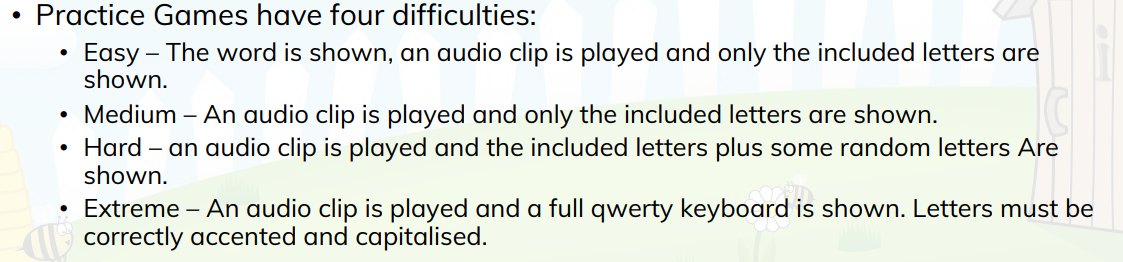
Levels of difficulty
Definition of levels of difficulty
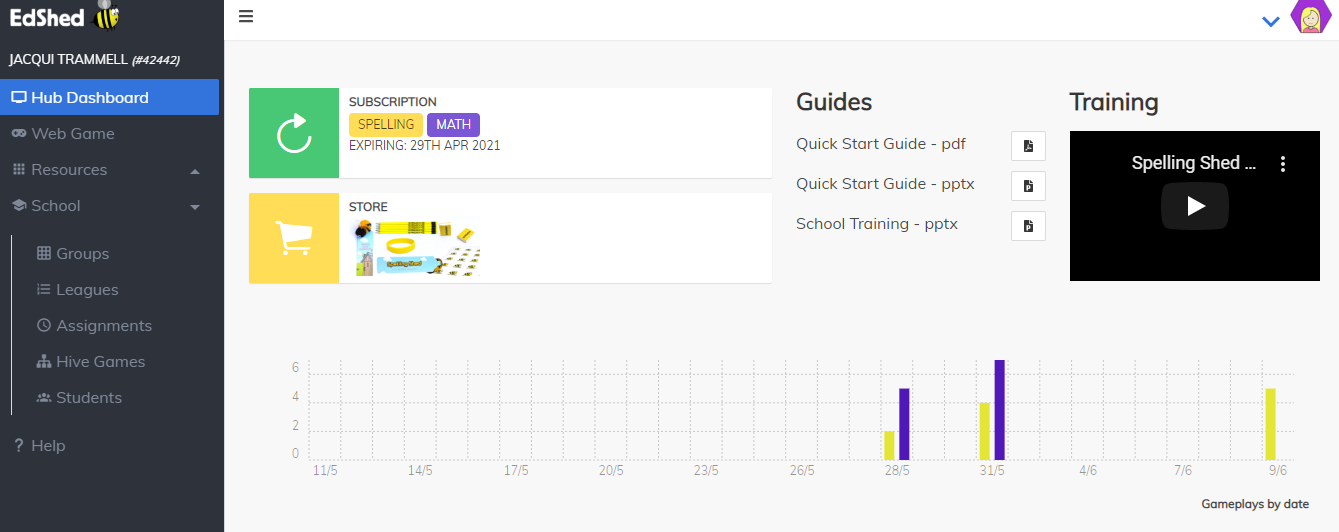
Little Bug is having a blast with these games. She loves the challenge and is having fun practicing her mouse skills to boot. You can enter your answers via the keyboard by typing or by mouse by clicking on the letters. She uses both and prefers the mouse because it is just fun right now. Adding your own customized lists is not too hard once you get the hang of it. It's best to be in the teacher hub section to add customized lists that way you can "assign" them to your student(s). The key to success with this program in my opinion is making sure you go to the teacher hub first and download/read the QUICK START GUIDE. Then play around in the TEACHER HUB area to familiarize yourself with what it has and can do. There is SO MUCH MORE to this program than what it appears.
BE SURE TO READ THE QUICK START GUIDE FIRST!
Teacher Hub (this is where you should add customized lists and assign them to your student(s).
SO MANY EXTRAS!!
I did not find the Spelling Shed program very user friendly at first but then realized that with some time and a fairly short learning curve I got more comfortable with it and realized its potential. The same is true for the Math Shed program. I love that there are not official grade levels listed for the students and you can assign them lists from anywhere. Being able to create your own custom lists is also a big plus.
Math Shed menu
Decimals
Times Tables
If everything available is still not enough then check out the RESOURCES tab in the teacher hub for more projects and activities that can even be printed out!
Extra resources available
If you are looking for a customizable and expansive spelling or math program that is online, fun, and a great challenge for your kid(s) I highly recommend you check out Spelling Shed and Math Shed from EdShed. They both have FREE 30 day trials so they are very much worth checking out. I don't think you will be disappointed if you give it a try and have a little bit of patience.
You can connect with EdShed on FACEBOOK, TWITTER, INSTAGRAM, and YOUTUBE. Please also be sure to check out the reviews from my fellow Crew members to see what they have to say about these two programs. Just click on the graphic link below.
There are a lot of online math programs available to choose from today. Smartick offers a fun math program that is online and geared for children ages 4-14. It boasts great progress for your student(s) in only 15 minutes a day (at least 5 days per week). I received a 6 month trial period to give this helpful math program a try. You need internet access and it can be used on a computer or tablet (Android and iOS apps available).
One key to this helpful math program is that it asks that you, the parent, NOT help your child. Let your child loose on this program for 15 minutes a day at least 5 days per week and the adaptive program will work with your child. The program helps with not only math but also mental agility, concentration, study habits, and reading comprehension. Once an exercise is completed the program allows the student to review and correct their mistakes. The program will explain to them how to get the correct answer. Smartick is an adaptive program that adjusts to your child's ability. As they work through their sessions and answer questions correctly they will earn "ticks" that they can use later in the Virtual World to "purchase" items.
Awesome results when used as suggested (at least 5 days per week for 15 minutes per day).
Login screen (from computer)
Topics covered include:
Counting
Numbers and Operations in Ten
Operations and Algebraic Thinking
Fractions
Decimals
Measurement and Data
Geometry
Integers
Expressions and Equations
Logic
Progress chart from parent page (shows subjects and how much covered)
Some of the lessons covered include:
addition and subtraction
classifying objects
numbers and numerical sequences
counting objects to determine quantity
comparing numbers
positional value
multiplication fundamentals
extension of the counting sequence
geometric solids
describing positions
describing and comparing measurable attributes
flat figures
measuring and estimating lengths
patterns
Login screen on tablet using iOS app (her favorite way to access the program)
I like that it asks her every time how she is feeling before starting her lessons.
Sample lesson on iOS app
Once your child completes their 15-minute session they will have access to the Virtual World where they can play to their heart's content. Little Bug just LOVES this section. She is always going to the house to update her avatar. There are many options for play in the Virtual World and I have noticed that Little Bug needs to learn more about how to work around in it. She doesn't seem to be taking advantage of all that is available in this area. There are more games and challenges available to help her improve her skills even more.
Virtual World
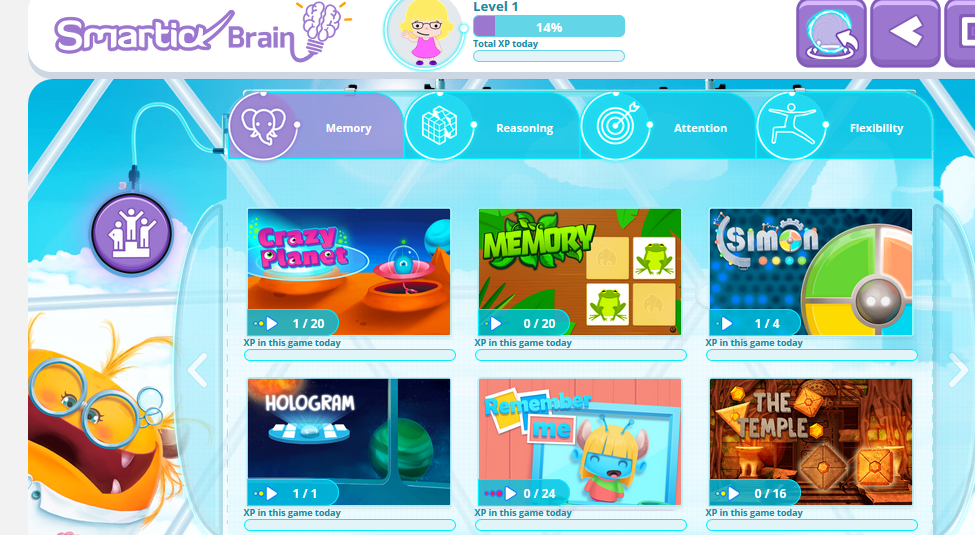
Brain challenges available in the Virtual World
In addition to your student login, there is a parent login where you can adjust settings, review your student's progress, and see details of your student's daily sessions (complete detail on what they got wrong and right and what topics were covered, etc). This is great since you are not supposed to help them through their lessons. This allows you to see what they covered in their session for the day and what they got wrong or right. It just keeps you in the loop for what they need to work on (the program will adjust for this in their next session). You will also get an email each time they complete a session that shows you how they did with a link to the parent page for further detail.
Parent page screen
Student results
Detailed student results (you can see exactly what questions they got wrong or right)
Motivational rewards available to be set from Parent page.
Email showing how your child's session went
There is so much to this online math program I found myself just a little overwhelmed with all that was available and trying to decipher just how it worked and what was expected of Little Bug. I noticed a small "need help?" option at the top of the homepage to the program. It has a wealth of information. I highly suggest you check it out as I think it will answer a lot of questions you might have about the program and how it works.
Wonderful information from the "Need help?" link on homepage.
Basically, you just let the program do its thing and it will adjust as it needs to for your child's ability. I have to say that it took me some time to come around to where I think I really do like this program. Little Bug has some patience and perfection issues so she can become quite belligerent and upset with the program when she can't figure something out or gets it wrong. It has been a good learning experience for her and the Virtual World acts as a good motivator for her to complete her sessions. I can see where she is progressing and I am looking forward to letting her continue this for the 6 months that we have it. We recommend this fun math program for what it can do in improving skills in areas more than just math.
You can connect with Smartick on FACEBOOK, TWITTER, INSTAGRAM, and YOUTUBE. Please also be sure to see what my fellow Crew members have to say about this program by clicking on the graphic link below. There is a free trial offer available so it would be worth checking it out.
If you are looking for a new homeschool math solution then I might have the answer for you. I was so excited to get to officially review the Family Membership for CTCMath. You can add up to 5 students with a family membership. Those of you who know me know that I talk about this curriculum a lot. It was a life saver for my son many years ago. It has continued to be the go-to math curriculum in our family. It is an online curriculum with an annual membership. At some levels, math worksheets can also be printed and then entered into the system when completed. My middle school students sometimes prefer to print the lesson out and work it out that way. Printed worksheets are not an option for my kindergartner.
8th grader working on his math
Middle School video lesson sample
We began our math journey using another math curriculum that worked great until we hit the 4th grade. My struggling learner son was getting bored and frustrated with the endless problems he had to complete. His frustration was severely hindering his ability to learn the material. We tried many options and finally found our solution with CTCMath. It covers grades K-12 including Calculus. It is a full curriculum from grades K-8. After the 8th grade they do recommend using it as a supplemental program but I noticed recently that they have added a LOT of new material so that may change in the near future.
K4 daughter working on math
Kindergarten sample video lessons
The lessons are short, to the point and focused. The lessons consist of a short (3 to 10 minutes depending on grade level) video lesson and then a short set of questions. There are generally only about 10 questions to answer for each lesson (but it varies as my K4 just completed a lesson with 20 questions). This may seem like your student wouldn't get enough training but on the contrary. The short math lessons keep your child's attention and help them to master subjects quickly. There are ways to customize the lessons and one of the options I chose is to require the kids to pass with at least a score of 90% or better. This helps me to feel confident they are mastering the material. They are allowed to retake the lesson as many times as necessary to pass. This is also all recorded for you to see in the reports on each student. The reports show you when and how many times it took a student to complete a lesson.
Detailed Middle School Report
Summary Middle School Report
By setting a minimum pass score it causes the kids to have to repeat the lesson until they can pass with a score of 90% or better. The kids really like the shorter lessons and generally do not get frustrated with the lessons. Once in a while, they hit a tough lesson that causes them to take a lot longer.
Student Dashboard
The lessons are broken into topics and within each topic grouping, you have the option to take a diagnostic test (used to determine what skills your child may need to work on) and a topic test taken at the end for testing purposes. We personally do not use the diagnostic tests regularly but I have heard that others use it to also test their knowledge at the end of the sections in addition to or instead of the topic tests.
There are so many wonderful benefits to this curriculum that I like including
instant results for the kids
self grading
ability to track everything the kids do
reports emailed to me
ability to assign "tasks" to keep kids on track
Assigned tasks
One of the main things that made this a success for my son was the instant feedback on whether his answer is right or wrong. It was a problem he struggled with from the beginning. It would take us hours to get through math because I had to sit with him and let him know after EACH question if he was right or wrong. I detested this, but it was how he was wired. He just melted down if he didn't know how he had done. CTCMath saved me from this agony. On the regular daily lessons, he sees after each question if he gets it right or wrong and it gives him the right answer if it is wrong. SCORE!
Another time saver is that everything is automatically graded for you and recorded. If I am not sure he is staying on task or completing lessons I can just log in to see what he did for the day, when he logged on, when he logged off, how long he took on the lesson, how many attempts he made and if he passed it or not and what his score was. It is wonderful!! I have found that I do have to "assign tasks" with him because otherwise he jumps around and looks for easier lessons to complete and gets all messed up on his lessons. That is one negative of this program is that it allows the student free access to any and all lessons (Yet a big positive for us since you can adjust grade levels per your student's needs). He can jump grades and lessons at will. It does not force him to finish anything in order. When I go in and assign him lessons using the task feature I am able to track if he is keeping things in order and completing the lessons he needs to complete in the order I want them completed. He can bypass this but it also shows that the task was not completed (I get emails on this also) and he, of course, has consequences from me (lost privileges and game time) when this happens.
The teacher, Pat Murray, is Australian so there is an accent and sometimes the foreign aspect comes through but it is not a problem for us. He is a wonderful teacher and makes the lessons engaging. My 7th grader noticed that "color" was misspelled the other day but I told her that the spelling of "colour" is also acceptable. I currently have my K4, 7th grade, and 8th grade students using this and they all enjoy it (as much as a child can of math).
I have my own PARENT LOGIN and each of the kids have their own individual logins with their own passwords. Once I log in I see my parent dashboard which gives me a screenshot of all the kid's progress and overall grades. I can assign tasks if necessary or use the tools to browse lessons, export data, or print checklists that I can use to manually log their lessons completed. I just recently realized that this is a good idea because with the menus being so complex it is time-consuming and difficult sometimes to keep up with what they are completing. If I manually write it down on the checklist sheet I can see at a glance what lessons they may have skipped or not completed.
Parent Dashboard
Checklist
Another fun feature that is easily missed is the math games at the bottom of each screen
Speed Skills
Times Tables
Swap pieces (I have yet to master this!)
Speed Skills (covers addition, subtraction, multiplication, division and order of operations) and Times Tables provide some excellent practice with a lot of fun for the kids.
We have been very happy with this math curriculum and I wholeheartedly recommend CTCMath. The Family Membership has been a perfect fit for us. They have wonderful discounts for homeschool families. Currently, you can take advantage of their FREE TRIAL which allows you limited access to try the program out. If you decide it is a good fit for you then you can take advantage of their DISCOUNT OFFER which includes 60% off retail price plus an ADDITIONAL 6 MONTHS FREE! You just cannot beat that offer.